Chat

Showing posts with label New Year. Show all posts

Tuesday, December 23, 2025

New Year - FTU

Scrap kit - Happy NY 2019 - HERE

Mask - Essex - HERE (1st mask)

Tube - Zindy - her store is currently unavailable

***Disclaimer***

This tutorial is of my own creation. I am using PSP2019. Please leave a thanks when downloading.  If I am using a template, I always start at the bottom and work my way up. If using a FTU or PTU tube - please don't use without proper copyright. Always drop shadow as you go. If you try one of my tuts, I would love to display it on my blog....thanks

~~~~~~~~~~~~~~~~~~~~~~~~

Image/canvas size/800x800

P5 - apply mask/merge group

E03

E94 - resize 85%

Click inside frame/modify/expand by 4/p3/11

E04

E06

Image3(2)

Png58 - resized 75%

E15 - resize 40%

E62

Image3

Word art - resize 60%

Position tube where you want

Merge visible/crop/resize as needed/add proper copyright 

Monday, December 22, 2025

Pup Happy New Year - FTU

Scrap kit - New Year 2018 - HERE

Mask - Your choice

Template - #148 - HERE

Tube - Marilyne Cazenave

Word art of choice or mine - HERE

***Disclaimer***

This tutorial is of my own creation. I am using PSP2019. Please leave a thanks when downloading.  If I am using a template, I always start at the bottom and work my way up. If using a FTU or PTU tube - please don't use without proper copyright. Always drop shadow as you go. If you try one of my tuts, I would love to display it on my blog....thanks

~~~~~~~~~~~~~~~~~~~~~~~~

Open template and delete copyright layer and word art layers

Image/canvas size/800x800

P11 - apply mask/merge group/send to bottom

Dots - flood fill black

Left and right frames - flood fill color of choice

Other frames - colorize 0,0

Left and right frame - p7

Oval - colorize same

Position close up

Layer properties to screen or what fits your tube

E13

Left and right small - p9

E25 - resize 80%

Rectangle - p8

E26

E21

Position tube

E5 - resize 40%

E39 - resize 60%

Duplicate/mirror

E36 - resize 40%

E6 - resize 40%

E22 - resize 60%

Merge visible/crop/resize as needed/add proper copyright

Barb


NY Word Art

Made another word art


Thursday, December 4, 2025

Celebrate - FTU

  Scrap kit - Happy New Year - HERE (2nd kit)

Mask - EFR blog - HERE (2nd one down)

Template - #26 - HERE

Tube - Pinuptoons

***Disclaimer***

This tutorial is of my own creation. I am using PSP2019. Please leave a thanks when downloading.  If I am using a template, I always start at the bottom and work my way up. If using a FTU or PTU tube - please don't use without proper copyright. Always drop shadow as you go. If you try one of my tuts, I would love to display it on my blog....thanks

~~~~~~~~~~~~~~~~~~~~~~~~

Open template and delete copyright layer

Image/canvas size/800x800

P2 - apply mask/merge group/send to bottom

1 - p11

E48 - resize 60%

E2

White frames - flood fill color of choice

Add noise of choice

3 - p9

5 - p10

7 - p4

8&9 - flood fill

Add noise of choice and a glass effect

E25 - resize 60%

E33 - resize 65%

E56

E55 - mirror

E18

E42 - resize 40%

E27 - resize 40%

E37 - resize 30%

Add small gradient glow

E20 - resize 30%

E59 - resize 30%

E51 - resize 40%

E1 - resize 20%

E5 - resize 40%

Add glass and gradient glow effect

Position tube

Merge visible/crop/resize as needed/add proper copyright

Saturday, November 29, 2025

HNY - FTU (Quick)


Scrap kit - New Beginnings by Simone - HERE

Mask - Your choice

Tube - Pinuptoons

Word art - HERE

***Disclaimer***

This tutorial is of my own creation. I am using PSP2019. Please leave a thanks when downloading.  If I am using a template, I always start at the bottom and work my way up. If using a FTU or PTU tube - please don't use without proper copyright. Always drop shadow as you go. If you try one of my tuts, I would love to display it on my blog....thanks

~~~~~~~~~~~~~~~~~~~~~~~~

New image 800x800

P18 - apply mask/merge group

Funhouse/xaggerate

E17 - resize 45%

E42

E45 - resize 60%

E68

E71

E70

Word art 

E35 - resize 40%

E69 - resize 50%

Position tube

Merge visible/crop/resize as needed/add proper copyright

Friday, November 21, 2025

NY Gold - FTU (Quick)

 Scrap kit - New Years Kit TTD - HERE

Mask - Your choice

Tube - Zlata_M - HERE

***Disclaimer***

This tutorial is of my own creation. I am using PSP2019. Please leave a thanks when downloading.  If I am using a template, I always start at the bottom and work my way up. If using a FTU or PTU tube - please don't use without proper copyright. Always drop shadow as you go. If you try one of my tuts, I would love to display it on my blog....thanks

~~~~~~~~~~~~~~~~~~~~~~~~

P33 - apply mask/merge group

E15 - resize 30%

Mura Meister/copies/encircle/12,65,65

Click inside with magic wand/modify by 8/p11

E33

E3

Position tube

E58 - resize 80%

Duplicate/mirror

Image3

Image2

E32 - resize 60%

Png2 - resize 25%

Word art

Merge visible/crop/resize as needed/add proper copyright

Adele

Sandy


Friday, December 27, 2024

NY Cheer - FTU


Scrap kit - Happy New Year by Elfairy - HERE (2nd one down)

Mask - Your choice

Template - by Jewel - HERE

Tube - Lynne (EFR) - HERE (this is AI)

***Disclaimer***

This tutorial is of my own creation. I am using PSP2019. Please leave a thanks when downloading.  If I am using a template, I always start at the bottom and work my way up. If using a FTU or PTU tube - please don't use without proper copyright. Always drop shadow as you go. If you try one of my tuts, I would love to display it on my blog....thanks

~~~~~~~~~~~~~~~~~~~~~~~~

Open template and delete copyright layer

Image/canvas size/800x800

P12 - resize 140%/apply mask/merge group/send to bottom

E4 - resize 70%

Rasters 1&2 - p2

Raster3 - p5

Raster4 - p4

Raster5 - p6

Position tube

Merge 6,7, and 8 together - p11

Duplicate tube/mirror/position as you want

I added:

Xero - radiance default/layer opacity to 70

E25 - resize 70%

E18 - mirror

E34 - resize 35%

Rotate right by 10

E20 - resize 30%

E59 - resize 35%

E51 - resize 40%

E27 - resize 40%

E10 - resize 95%

Merge visible/crop/resize as needed/add proper copyright

Rosey

KITT


Sunday, December 22, 2024

HNY - FTU

 Scrap kit - New Year Bling by DBS - HERE

Mask - Your choice

Template - #1 by Deana - HERE

Tube - Alicia Mujica - HERE

***Disclaimer***

This tutorial is of my own creation. I am using PSP2019. Please leave a thanks when downloading.  If I am using a template, I always start at the bottom and work my way up. If using a FTU or PTU tube - please don't use without proper copyright. Always drop shadow as you go. If you try one of my tuts, I would love to display it on my blog....thanks

~~~~~~~~~~~~~~~~~~~~~~~~

Open template and delete copyright layer

Image/canvas size/800x800

P1 - apply mask/merge group/send to bottom

E104

E92

Ellipse bkgd - flood fill and add noise of choice

Ellipse - p18

E125

E122 - resize 50%

Rect backgrounds - flood fill/add noise

Rectangle top - p14

Rectangle bottom - rotate p14 by 90

E114

Diamond backgrounds - flood fill/add noise

Diamonds - p5

E58 - resize 40%

Duplicate/mirror

Position tube

E78 - resize 50%

E64 - resize 45%

E57 - resize 45%

E63 - resize 35%

E53 - resize 40%

Merge visible/crop/resize as needed/add proper copyright

KITT


Wednesday, December 27, 2023

Midnight Gold - FTU

 Scrapkit - MizTee - NY 2018 - HERE

Mask - EFR Blog - HERE (2nd mask)

Template - EFR Blog - HERE (2nd one by KF)

Tube - Exclusive to Magical Moments Forum - HERE

***Disclaimer***

This tutorial is of my own creation. I am using PSP2019. Please leave a thanks when downloading.  If I am using a template, I always start at the bottom and work my way up. If using a FTU or PTU tube - please don't use without proper copyright. Always drop shadow as you go. If you try one of my tuts, I would love to display it on my blog....thanks

~~~~~~~~~~~~~~~~~~~~~~~~

Open template and delete copyright layer, word arts, and background layer

Resize by 80%

Image/canvas size/800x800

P19 - apply mask/merge group

Duplicate/flip

Large blue rectangle - p18

White squares - p7

Merge blue circles - p13

Add small border and add noise of choice

Position close up with your choice of effects

E1 - resize 90%

E33 - resize 75%

Main tube

E26

Snowflake layers - adjust/hue&sat/hsl 50,40,25

E21

E57

E39

E5 - resize 50%

E48 - resize 65%

E36 - resize 35%

E22 - resize 65%

E18 - resize 30%

E6 - resize 30%

E50 - resize 30%


Merge visible/crop/resize as needed/add proper copyright


Dee/firelady


Emma
KITT


Happy New Year - FTU

 Scrapkit - New Year by Anorie - HERE

Tube - Pinuptoons - HERE

My supplies (frame and mask) - HERE

***Disclaimer***

This tutorial is of my own creation. I am using PSP2019. Please leave a thanks when downloading.  If I am using a template, I always start at the bottom and work my way up. If using a FTU or PTU tube - please don't use without proper copyright. Always drop shadow as you go. If you try one of my tuts, I would love to display it on my blog....thanks

~~~~~~~~~~~~~~~~~~~~~~~~

Open supplies and delete copyright layer 

Image/canvas size/800x800

Mask layer - E27

Erase any in middle

Grab magic wand and click inside each frame/selections/modify/expand by 4

P2/place below/invert/delete/select none

Do same for inside frames using p3

E11

Erase any in middle

Click top layer

Type out a word or words for between frames

E22

E29

E35 - resize 60%

E1 - resize 45%

E23 - resize 60%

Image/free rotate/left by 90

E7 - resize 50%

Duplicate/mirror

E9 - resize 35%

E24 - resize 75%

Duplicate - resize 85% and mirror/position below flowers

Position your tube

Merge visible/crop/resize as needed/add proper copyright

Sunday, December 17, 2023

2024 WordArt - FTU

Made some 2024 word art...click image and save.

Would like to see how you use this....thanks


Tuesday, December 12, 2023

New Days/New Chances - FTU

 Scrapkit - New Year 21 by MizTeeque - HERE

Mask - Your choice

Template - Mine - HERE

Tube - Exclusive to Magical Moments Forum - HERE

Word Art - Mine - HERE

***Disclaimer***

This tutorial is of my own creation. I am using PSP2019. Please leave a thanks when downloading.  If I am using a template, I always start at the bottom and work my way up. If using a FTU or PTU tube - please don't use without proper copyright. Always drop shadow as you go. If you try one of my tuts, I would love to display it on my blog....thanks

~~~~~~~~~~~~~~~~~~~~~~~~

Open template and delete copyright layer and snowflake layer

P8 - apply mask/merge group/send to bottom

E15 - resize 90%

Raster2 - p2

Bottom - p9

E30

E19 - resize 30%

Mura meister/copies/encircle 20,70,70

Add gradient glow

White frames - Alien Skin Xenofex/constellation or noise of choice

Frame fills - p6

VM Natural/Sparkle/top number to 5

City scape (at end of tutorial)

Add a gradient glow of choice

Position word art and add same gradient glow

E4 - resize 35%

Position tube (I resized mine to 35%)

E14 - resize 60%

E26

E3 - resize 55%

E2 - resize 90% and flip vertical

E34 - resize 25%/image/free rotate/right by 20

Merge visible/crop/resize as needed/add proper copyright

Lavada
KITT


Monday, December 11, 2023

New Year Word Art - FTU

Found this saying and thought it was so fitting for the New Year....as usual, if you use this, I would love to see what you create. Just click the image and save...Thanks


Wednesday, December 6, 2023

New Year Bling - FTU

Scrapkit - New Years Bling by Shelly - HERE

Template - #107 by Becky - HERE

Tube - Pinuptoons - HERE

***Disclaimer***

This tutorial is of my own creation. I am using PSP2019. Please leave a thanks when downloading.  If I am using a template, I always start at the bottom and work my way up. If using a FTU or PTU tube - please don't use without proper copyright. Always drop shadow as you go. If you try one of my tuts, I would love to display it on my blog....thanks

~~~~~~~~~~~~~~~~~~~~~~~~

Open template and delete copyright layer, 3 squares layer, and word art

Image/canvas size/800x800

Circle big - add noise of choice

Circle - p17

E124 - resize 90%

E91 - resize 80%

Rectangle bg - add noise of choice

Rectangle - p4

Square - p10

Snowflakes - delete their background

Frame - p14

E118

E92 - resize 80%

E122

E86 - resize 60%

E125 - resize 90%

E109 - resize 60%

Strip - p1

E58 - resize 35%

Swirl - p5

E114 - resize 70%

E123

E99

Position tube

E64 - resize 30%

Duplicate/mirror

E63 - resize 30%

E7 - resize 40%

E80 - resize 35%

E33 - resize 40%

You can animate if you want

Merge visible/crop/resize as needed/add proper copyright 

Friday, December 24, 2021

Pink with Silver - FTU


Scrapkit - Cheers - HERE

Mask - HERE 2nd mask

Tube - VMT - HERE

***Disclaimer***

This tutorial is of my own creation. I am using PSP2019. Please leave a thanks when downloading.  If I am using a template, I always start at the bottom and work my way up. If using a FTU or PTU tube - please don't use without proper copyright. Always drop shadow as you go. If you try one of my tuts, I would love to display it on my blog....thanks

~~~~~~~~~~~~~~~~~~~~~~~~~~~~~~~~~~~~~~~~~~~~~~~~~~~~~~~~~

P7 - apply mask/merge group

Frame4 - resize 110%

E28 - resize 35%

Mura meister/copies/encircle

12,65,65

Drag below frame

Erase the flower inside

Magic wand/click inside frame/modify/expand by 4/p15/invert/delete/select none

Frame2

Add your close up

Xero - tekstya at default 

E27 - resize 20%

Mura meister/copies/encircle/12,60,60

E40

E32

E35 - duplicate 2 times and position across bottom

E34

E17

Position tube

E16 - resize 40%

E2

E14 - resize 30%

Merge visible/crop/resize as needed/add proper copyright

KITT

Gigi


Friday, December 17, 2021

Almost Midnight - FTU


Scrapkit - Almost Midnight - HERE

Template - HERE #3

Mask - #24 -  HERE

Tube - Zlata_m - got this from Hania's store(not sure where she is now)

***Disclaimer***

This tutorial is of my own creation. I am using PSP2019. Please leave a thanks when downloading.  If I am using a template, I always start at the bottom and work my way up. If using a FTU or PTU tube - please don't use without proper copyright. Always drop shadow as you go. If you try one of my tuts, I would love to display it on my blog....thanks

~~~~~~~~~~~~~~~~~~~~~~~~~~~~~~~~~~~~~~~~~~~~~~~~

Open template and delete copyright and glass

Image/canvas size/800x800

P10 (resize by 140%) - apply mask/merge group

Doodle flower2 - duplicate/flip

Red right square - p14

Black strip - flood fill white/add noise

Texture strip - p9 - opacity to 70

Left red square - p18

Left black square - p9

Black circle - clock1

Large black square - flood fill white/add noise

Texture red square - flood fill black

Large red square - p14

Bubbles1 - duplicate

Merge bobbles layer down

Duplicate/mirror

White square - p11

Add a small black border if you want

Add close up

Xero - radiance at default

Layer properties to multiply or what you like

Position tube

Streamer 3

Glasses - resize 60%

Poppers - resize 35%

Hat 2 - resize 45%/mirror

Knot1 - resize  20%

Merge visible/crop/resize as needed/add proper copyright

Let me know what you create!


Sunday, January 3, 2021

Another NY - FTU


Scrapkit - GoF HERE (download is bottom left corner)

Mask - HERE 0245

Tube - FTU by BAMA - HERE (the tube I used is a special made for EFR Thurs night chat)

~~~~~~~~~~~~~~~~~~~~~~~~~~

Remember to DS as you go

E99 - image/canvas size/800x800

E98

E100 - resize 90%

Open p6 and apply mask/merge group

Paste onto canvas and send to bottom

E65

E77  - position bottom right

Duplicate/image/mirror and move up a little

E116 - flip

E5 - mirror

Position tube

E48 - resize 45%

E81 - erase stems

Duplicate/image/mirror and position

Resize 45%

E49 - resize 60%

E41 - place left side

E90 - resize 30% and drag down

E13

Crop/resize as needed/merge visible/add proper copyright

Would love to display your work


Wally's creation


Friday, January 1, 2021

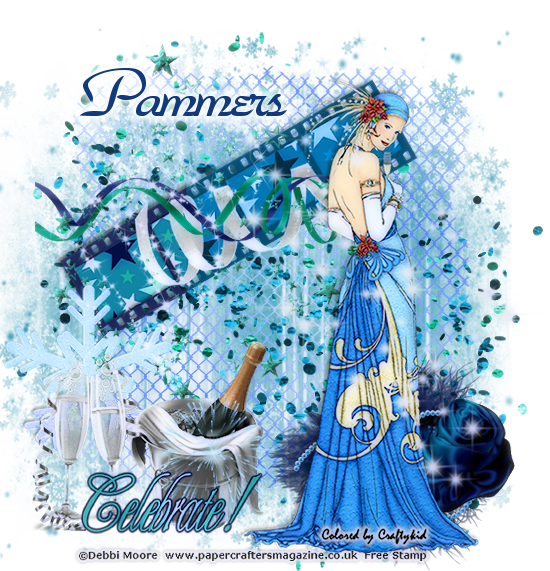
NY1 - FTU


Scrapkit - Celebrate - HERE

Mask - 4th one down - HERE

Tube - Sprite by Nocturne - HERE

~~~~~~~~~~~~~`

Open p16 and apply mask - merge group

Wire 

Confetti

Negative - paste onto canvas

Image/free rotate/left by 30

Grab your magic wand and click inside each of the negative frames/expand by 3/paste p9/invert/delete/select none and move down one layer

Word art 1- image/free rotate/left by 30/and place on negative

Add a thick gradient glow to the wordart

Merge top 3 layers together and move up some 

Snowflake - position on the left so some of it is touching the negative

Paste tube and position on the right

Rose boa -position so tube is sitting on it

Word art 2 - position bottom left

Champagne2 - resize 65% and position a layer down

Star spiral - position top left

Streamers - rotate left and place left

Sparkles - position top right

Sparkles2 -position middle left

Merge visible/crop/resize as needed/add proper copyright


Another beauty from Wally

Lolis 
Judyann created this

Shelly
KITT

Kelli


Wednesday, December 30, 2020

Celebrate - PTU


Scrapkit - New Years Glitter - HERE

Mask - 004 - HERE (4th one down)

Tube - Lysisange- FTU - HERE it says $1 but it is free

~~~~~~~~~~~~~~~~~~~~~~~~~~~~~~~~~~~~~

I  always start at the bottom and work my way up

Remember to DS as you go

Open template and delete copyright layer

Hide the white background

Image/canvas size/800x800

P4 - apply mask/merge group/duplicate

Adjust hue/saturation to your liking - do this for any element you want

E20 - resize 90% - center on mask

Position your tube

E10

E15

E85

E67 - resize 45% and place left

E33 - resize 45% and down one layer

Duplicate/image/mirror and position

E25 - drag down to below ribbon

E41 - resize 45% and place left

E35 - place on left and drag below the clock

E24

Click top layer

E65 - resize 30%

E77 - resize 40%

E30

Merge visible/crop/resize as needed/add proper copyright

Would love to see what you make.


My go to,Wally made this


Friday, December 25, 2020

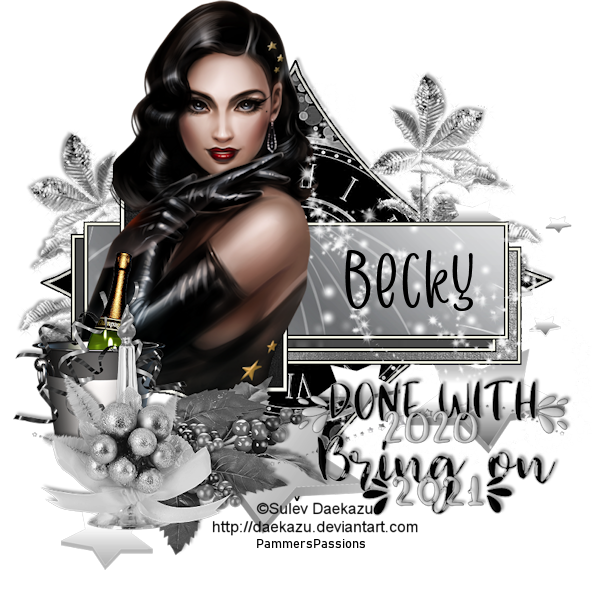
HNY-FTU


Scrapkit - Dazzlin Divas - HERE

Template - SE #109 - HERE

Tube - Sulev Daekazu - FTU - HERE (most forums have these tubes in their FTU artist permissions)

Word Art - HERE

~~~~~~~~~~~~~~~~~~~~~~~~~~~~~

Remember to DS as you go

I always start at bottom and work up

Open template and delete copyright layer and white background

Diamond fill - p10 (resize 70%)

HNY leaves - resize 20%

Duplicate/image/mirror/free rotate left by 20

HNY stars2 - resize 35%

Frame3 fill - p5

Frame2 fill - p1

Frame1 fill - p2 resized 30%

Main frame fill - p4

Ribbon3 - resize 13% and erase any outside the fill

Place your tube as you see fit

HNY Stars - resize 20%

HNY sparkles - resize 35%

HNY berries3 - resize 20%

HNY candle - resize 20%

Word Art - Adjust/hue saturation both to 0 and resize 60%

Merge visible/crop/resize as needed

Would love to see what you create


Another stunner from Wally


Andi created this beauty!!