Chat

Showing posts with label TTL. Show all posts

Sunday, January 5, 2020

Snow - TTL Exc


Scrapkit - by Tika "Iced Pink Winter" - TTL Exclusive kit HERE
Mask - Your choice
Tube - PUT at CDO
Effect - VanDerLee-snowflake HERE  (I used the http download)
~~~~~~~~~~~~~~~~~~~~~~~~~~~~~~~~~~~~~~~~~~
Open pp1 and apply mask of choice/merge group
Add new raster with white/send to bottom
Frame1 - resize80%
Winterbling1 - resize 80%
Flower1 - resize 15% - paste onto image
Effects/mura meister/copies/encircle/change top 3 to 12, 75, 75
Pinkgarland - resize 60%
Bow1 - resize 35%
Leaves - resize 65%
Florish2
Sparkles1
bearsledding - resize 40%
Place your tube
Crop and resize/add proper copyright
Click back on your winter bling layer
Effects/vanderlee/snowflakes/amount is 100/maximum size is 10/random seed at 0/ok
Right click/copy merged
In AS click/paste as new animation
*back on your bling layer in psp/undo
Effects/vdlsnowflakes/change random seed to 50
Right click/copy merged
right click on image in as and PASTE AFTER CURRENT FRAME
back on your bling layer in psp/undo*
Repeat from * to * as many times as you want (I did mine 4 times) increasing the random seed by 50 each time
Once you are done, you can slow down the snow fall by:
Edit/select all then click on animation/frame properties and change the number to whatever you want (mine is at 25)
enjoy

Garden - TTL Exc


Scrapkit by JST Exclusive to TTL - HERE
Template - Marilyn T2 - HERE
Tube - by Danny Lee with S&Co HERE
Effects - VanDerLee - snowflakes
~~~~~~~~~~~~~~~~~~~~~~~~~~~~~~~~~~~~~~~~~~~~~~~~~~~
Open template, delete copyright, very bottom shape (star), arrows, and word art layers
Unhide white background layer
I always work from bottom up
Paste p8 and apply mask of choice
Ele4
Ele3
Ele42/mirror
Brn shape - p1
Brn shape p3
Merge thesse 2 together for animation layer
Tan shape - p6
Ele29 - resize 55% and put one on each circle
Ele45 - resize 70%
Ele35 - resize 45%
Ele32  - resize 20%
Ele13 - canvas size 700x700....lets put some flowers in these pots and work on this as the canvas for now
feel free to add your flowers how you want....here are my sizes and flowers I used:
Ele30 - laid on edge
Ele16 - 50% - put in corner
Resize the elemnt by 60% and place other corner/image/mirror
Ele28 - 60% - lay at bottom
Ele28 - place on ele16 and position to your liking - erase the stems
Ele27 - erase stems and put on top - image/flip/image/free rotate 30 to the right
Ele42 - 40% place left top - move under ele27
duplicate/image/mirror
Ele9 -60% and place right of pot
Merge visible - resize 40% and paste onto original canvas
Bring ducks and frog above this ele
Now for the tube - you can do as you want, I did her in all 3 circles....you play with what you like best... I grey scaled for the blue circles and then added Xero-porcelain...layers-luminanceL
With my close up....I image/free rotate right 30
Crop your image now, the tricky part:
x out the top 8 layers and from the bottom up - 5 layers - merge visible...reopen all your layers
Add proper copyright and name
~~~~~animation part~~~~~~~
open AS
On your ani layer go to
Select/all/float/defloat
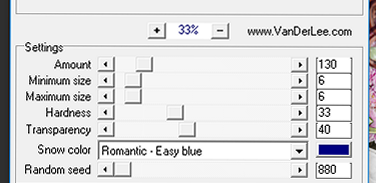
Effects/vanderlee/snowflakes with these settings:
Garden Effect10
Then select none
copy merged
paste in AS as a new image
back in PSP, hit undo 2 x
VDL/snowflakes with random seed at 860
in AS, paste after current frame
PSP
hit undo 2 x
VDL/snowflakes with random seed at 840
copy merged
in AS, paste after current frame
Check your image and save

HNY - TTL Exclusive


Kit - Elegant New Year by Tika TTL HERE

Template by Denz - #204 HERE

Tube - Ismael Rac....use only with proper copyright ...he is HERE


~~~~~~~~~~~~~~~~~~~~~~~~~~~~~~~

Open template, delete copyright layer

PP6 - send to bottom apply mask of choice/merge group

Sm circle 1 & 2 - pp4

Black Oval - pp3

Blue semi circle - pp5

Blue rectangle - pp1

Pink rectangle - pp6

Small blue strip - pp4

Starbunch

Stargarland - resize 50%

Sparkle2 - Image/free rotate/ right by 90 degrees

Sparkle1 - resize 75%

Open the star and place your tube in it...erase any you want...resize to fit on tag

Use a fancy font and write your words

I used Inspiration but is a PTU font

Merge visible/crop/resize as needed and add proper copyright